Edit Your Client's Engine.ini to Connect To The Astroneer Server
Edit Your Client's Engine.ini to Connect To The Astroneer Server
Editing your client's engine.ini to connect to the Astroneer server is a crucial part of Astroneer server management. This ini file stores essential config and saved settings, helping the server run smoothly and ensuring players can connect without issues.
Editing the Engine.ini config file
- On your keyboard, press
Windows + Rand enter%appdata%
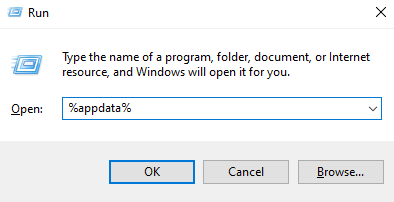
- Navigate the following directory:
Local\Astro\Saved\Config\WindowsNoEditor\Engine.ini
- Open the
Engine.inifile using a text editor.
If you cannot see the Engine.ini file. Make sure you launch the game to generate the files.
- Add the following line.
  [SystemSettings]
  net.AllowEncryption=false
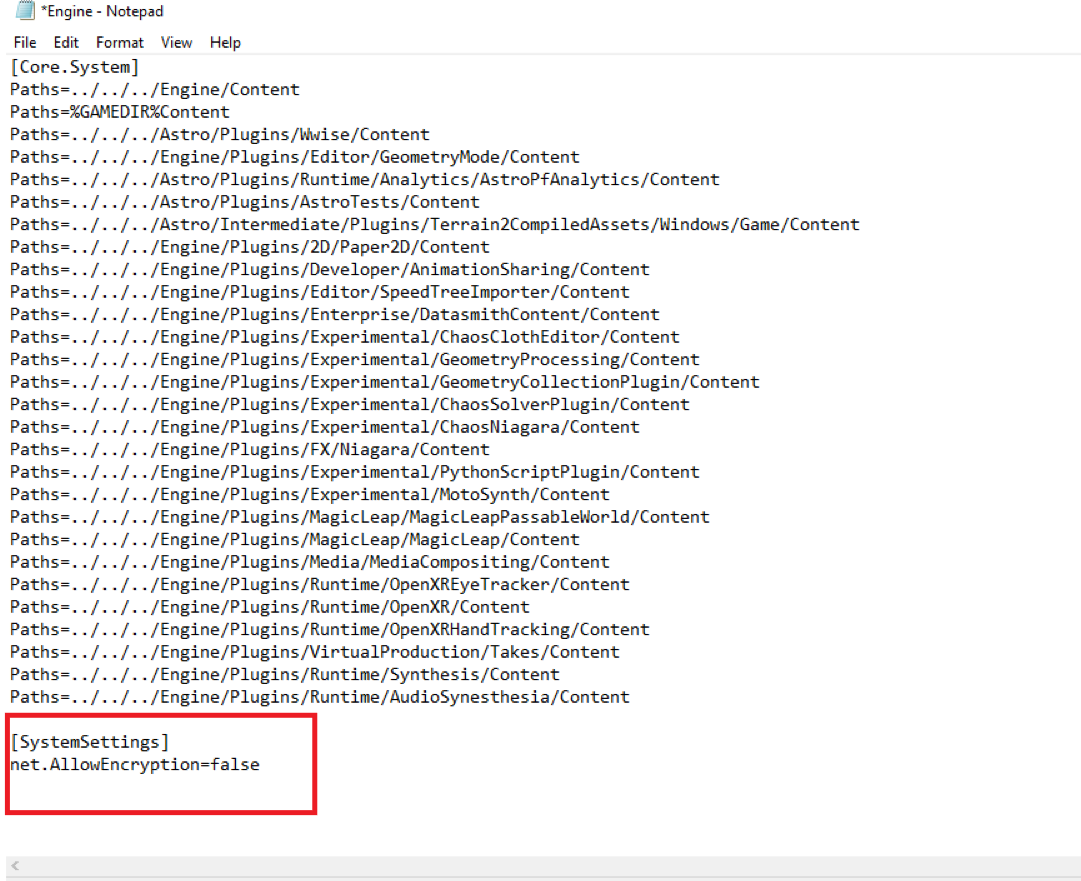
- Make sure to save the changes.
- Run your game and start playing with friends.
Still have some questions?
Don't hesitate to reach out to support! Just create and log a ticket here, and we can help!
Updated on: 10/02/2026
Thank you!