How to Add Workshop Scenarios to an Arma Reforger Server
Adding Workshop scenarios to your Arma Reforger server allows you to change missions, introduce new gameplay experiences, and customize how players interact with your server. Scenarios are typically distributed through the Workshop and must be properly configured on the server to load correctly. While this is usually done through the server configuration file, this guide explains how to add Workshop scenarios using the Apollo Panel.
Adding Workshop Scenarios Using the Apollo Panel
- Install and enable the Workshop Scenario on your computer, then install it on your server. You can read our install mods article on how you can add Workshop mods/scenarios onto your server.
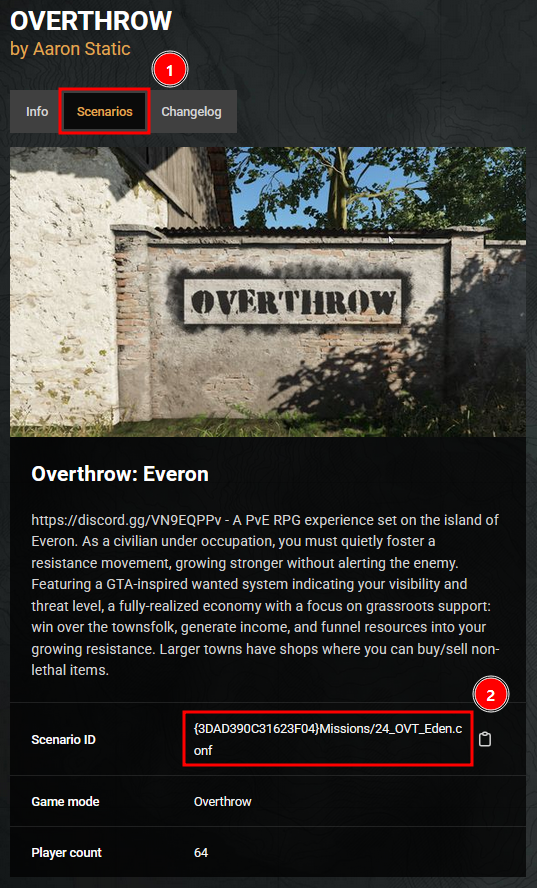
- Search for the workshop scenario that you want to use on the Arma Reforger Workshop Website.
- Go to the Scenarios tab and copy the "Scenario ID".
- While your server is offline, navigate to the Properties Tab, look for the setting titled "game → scenarioId" and set the value to the Scenario ID copied from earlier.
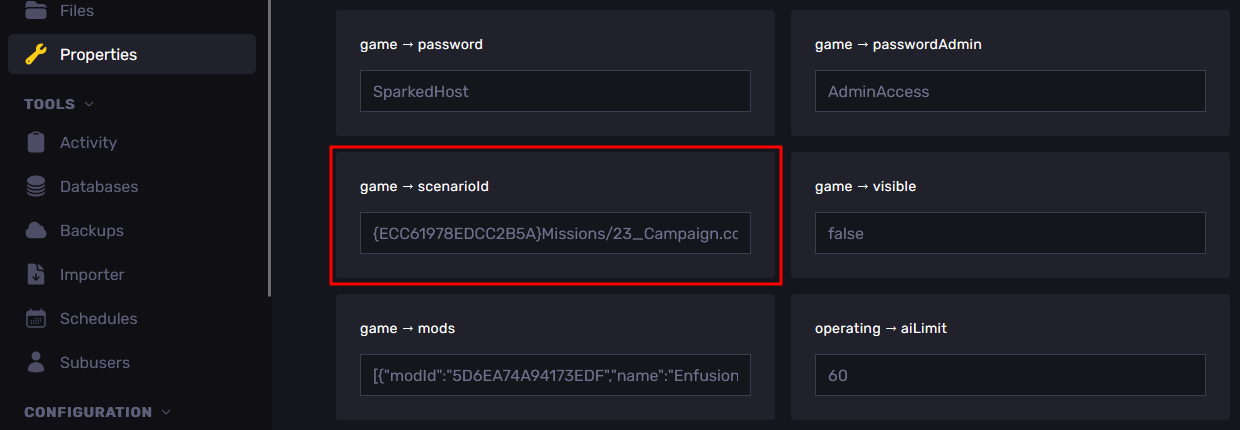
- Restart the server, and your server will now use the workshop scenario that you have installed on the server.
Updated on: 02/04/2026
Thank you!