How to Change Valheim Server Difficulty
Learning how to change Valheim server difficulty gives server owners more control over combat, resources, raids, and other gameplay mechanics. Using world modifiers, a Valheim dedicated server can be configured for easier combat, harder enemies, different resource rates, raid frequency, and death penalties. You can adjust these settings to create a more casual experience or a greater challenge, depending on what players want. Changes can also affect an existing world, so it is important to understand how each modifier affects the current save before making changes.
To change the server's difficulty settings, we will download the dedicated server's world and modify it locally.
Downloading the World
- Access the Apollo Panel.
- Stop the server.
- Open the "Files" tab.
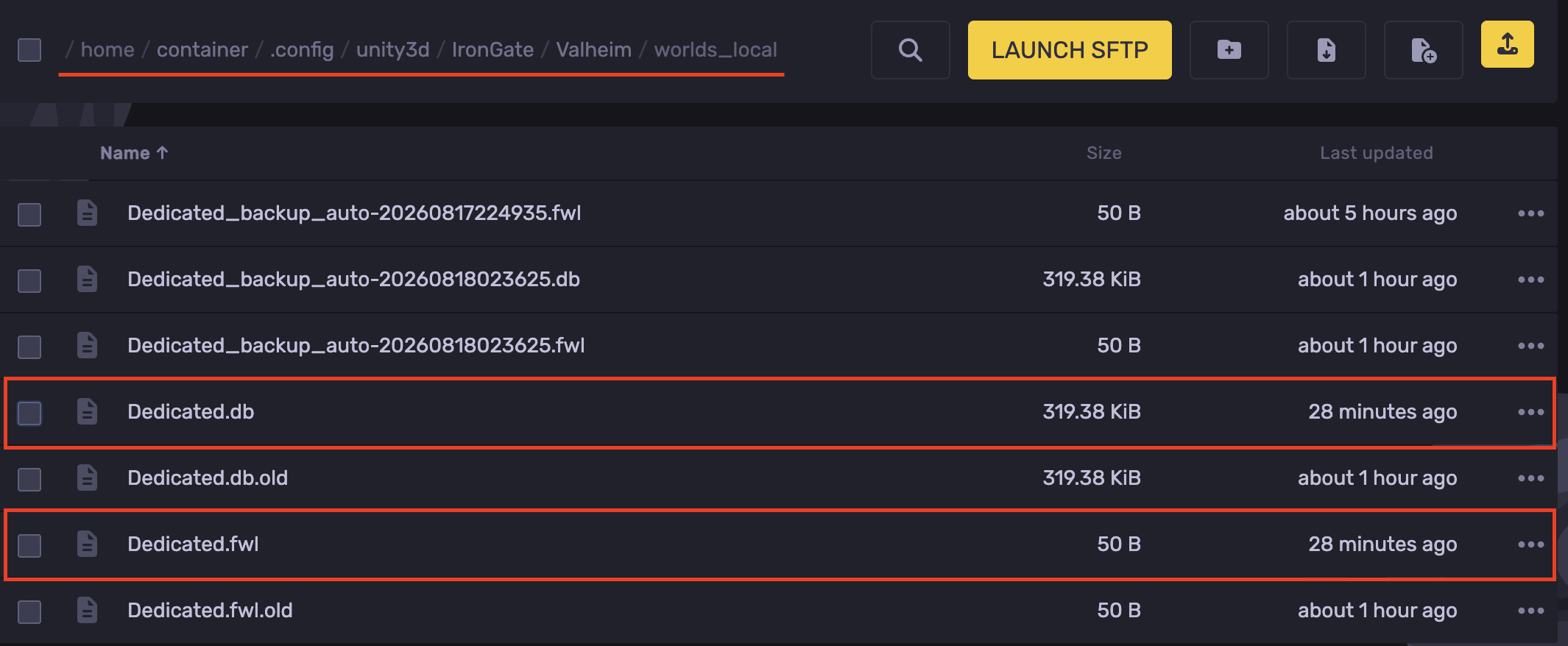
- Navigate to the following directory: `.config/unity3d/IronGate/Valheim/worlds_local`
- Download both the `.db` and `.fwl` files for your world.
Uploading the World Locally
- On your keyboard, press `Windows + R` and open the following directory: `%AppData%..\LocalLow\IronGate\Valheim\worlds_local`
- Upload the `.db` and `.fwl` world files.
- Once copied, you can access the world through your game client.
Changing Difficulty Settings
- Open Valheim.
- Click on Start Game.
- Select the uploaded world from the list of available worlds.
- Hit World Modifiers.
- Make the desired changes to the difficulty settings.
- Start the world and connect to it to apply the changes.
- Now, upload the edited world to your server. You can refer to this guide.
- Once uploaded, st
Updated on: 12/09/2026
Thank you!