How To Connect To Euro Truck Simulator 2 Server
Connecting to a Euro Truck Simulator 2 (ETS2) server is a straightforward process, whether you're joining a friend’s private server or exploring community convoys. Once the server is configured and running, here's how you can hop in and hit the road:
- Launch Euro Truck Simulator 2 and ensure you're using the same version and mods as the server
- Navigate to the “Convoy” tab on the main menu
- Click “Browse” to view available servers or use “Direct Connect” to enter an IP address
- Enter the server password if required
- Click “Join” and wait for sync to complete
Method 1: Joining From Session Search ID In Your Panel
To join your ETS2 server using the session search ID from your panel:
- Login to control panel and start your server.

- Once your server has started, locate Session search id and copy the numbers before "/101".
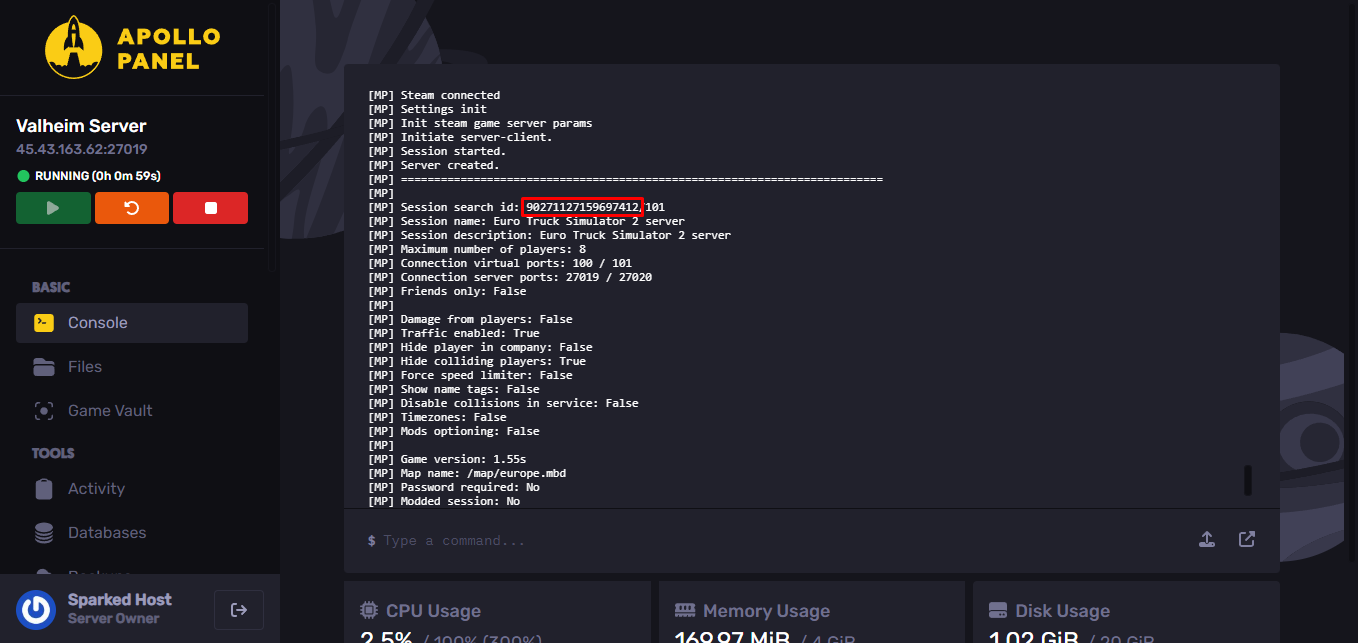
- Start your Truck Simulator game, select your preferred profile and click on the Convoys button.

- Paste the search identifier of your session in the search bar.
- Click on your server and then on Join convoy.

Great, you were able to connect to your Euro Truck Simulator 2 server.
Still have some questions about connecting to a Euro Truck Simulator 2 server?
Contact our support team through a support ticket.
Updated on: 14/07/2025
Thank you!