How to Add a Password on a Renown Server
How to Add a Password on a Renown Server
Understanding how to add a password on a Renown server plays a key role in keeping a Renown server secure, organized, and enjoyable for everyone involved. Server owners often add a password to control access, prevent uninvited players from joining, and protect administrator features such as admin settings and creative mode. This added layer of control helps maintain fair gameplay, reduces interruptions during active sessions, and ensures the server environment remains stable, especially for private groups, early access testing, or dedicated communities.
To add a server password, follow the steps below:
- Open your Apollo Control Panel here.
- Stop the server.
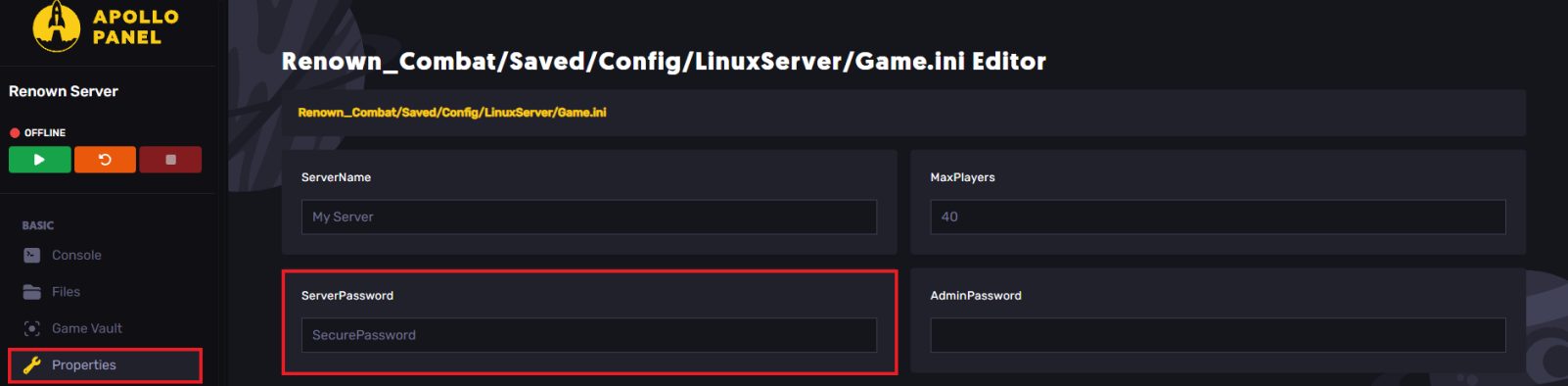
- Navigate to the Properties tab.
- Find the
ServerPasswordfield.
- Input the desired password.
- Save the changes.
- Start the server.
Still have some questions?
If you encounter any issues or need further assistance, please log in and create a support ticket here.
Updated on: 26/12/2025
Thank you!