How to Change the Gamemode Map on a Renown Server
How to Change the Gamemode Map on a Renown Server
Changing the gamemode map is a common practice for server owners, and knowing how to change the gamemode map on a Renown server allows administrators to keep gameplay dynamic and engaging. By switching maps or gamemodes, such as team deathmatch or last team standing, server owners can tailor the experience to their community, maintain player interest, and ensure each session feels fresh and balanced. This approach also helps create variety, highlight new content, and support a more enjoyable and controlled gameplay environment.
- Access your Apollo Control Panel here.
- Stop your server.
- Navigate to the Properties tab.
- Locate the MapRotation field and set the desired game mode map.
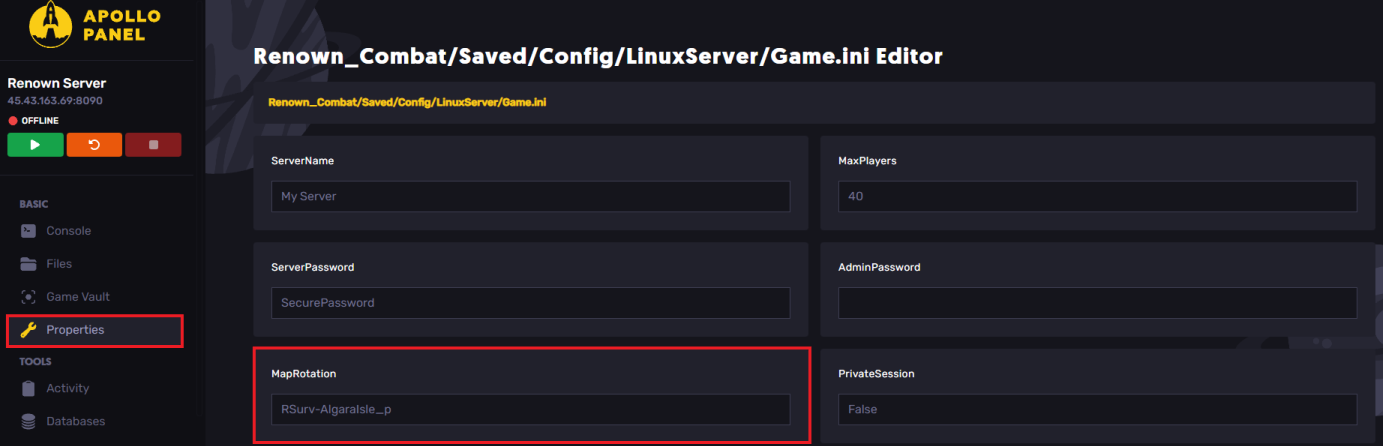
- Start or restart your server.
Game Mode Maps
Category | Value |
|---|---|
Survival | |
Survival | |
Free-For-All | |
Free-For-All | |
Free-For-All | |
Free-For-All | |
Free-For-All | |
Free-For-All | |
Team Deathmatch | |
Team Deathmatch | |
Team Deathmatch | |
Team Deathmatch | |
Team Deathmatch | |
Last Team Standing | |
Last Team Standing | |
Last Team Standing | |
Last Team Standing | |
Last Team Standing | |
Raid | |
Raid | |
Still have some questions?
If you require further assistance, please submit a support ticket to our support team here.
Updated on: 26/12/2025
Thank you!