How to Change the Max Players on a Renown Server
How to Change the Max Players on a Renown Server
Adjusting the max players on a Renown server is a key part of managing Renown game servers. It allows server hosts to balance server performance, world settings, and game mode for larger or smaller groups. Properly setting the player limit ensures zero lag, smooth resource gathering, and a better overall experience for everyone online, while maintaining control over server files, configuration, and hardware resources. In this guide, we'll show you how to change the max players on a Renown server.
- Access your Apollo Control Panel here.
- Stop your server.
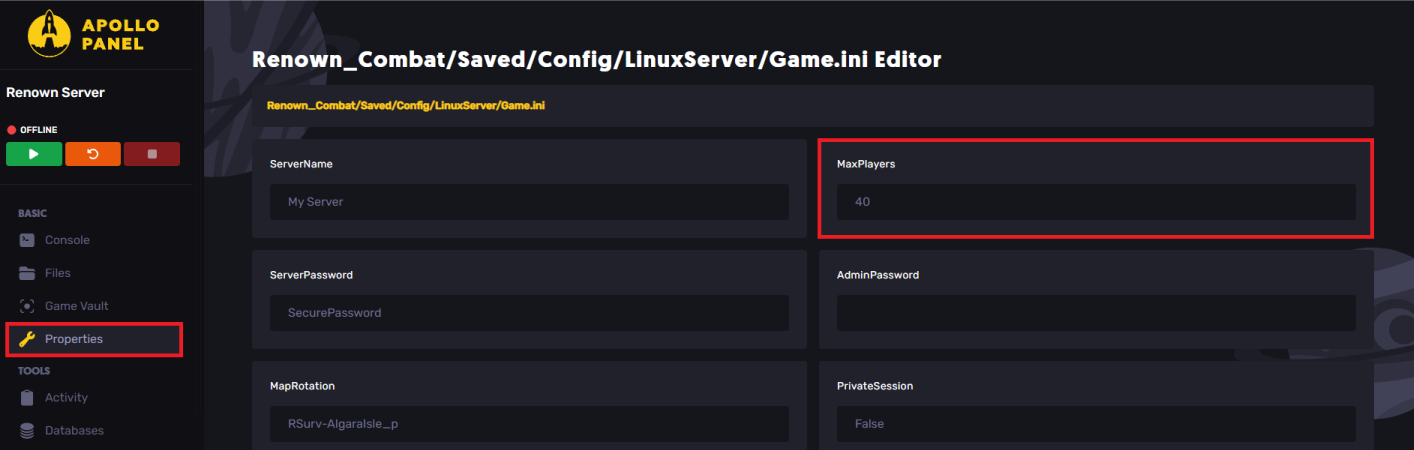
- Navigate to the Properties tab.
- Locate the MaxPlayers field and adjust it as desired.
- Start the server.
Still have some questions?
If you need any further assistance, you can create a support ticket here.
Updated on: 26/12/2025
Thank you!