How to Change the Server Name on a Renown Server
How to Change the Server Name on a Renown Server
Changing the server name on a Renown server is a common way for server owners to create a unique identity for their game servers and make their own world more recognizable to friends and the community. A descriptive Renown server name helps distinguish a server from other servers, adds personality, and enhances the overall gaming experience by making it easier for players to connect, join, and engage with the world. In this guide, we'll show you how to change the server name on a renown server to customize your server as desired!
- Access your Apollo Control Panel here.
- Stop the server.
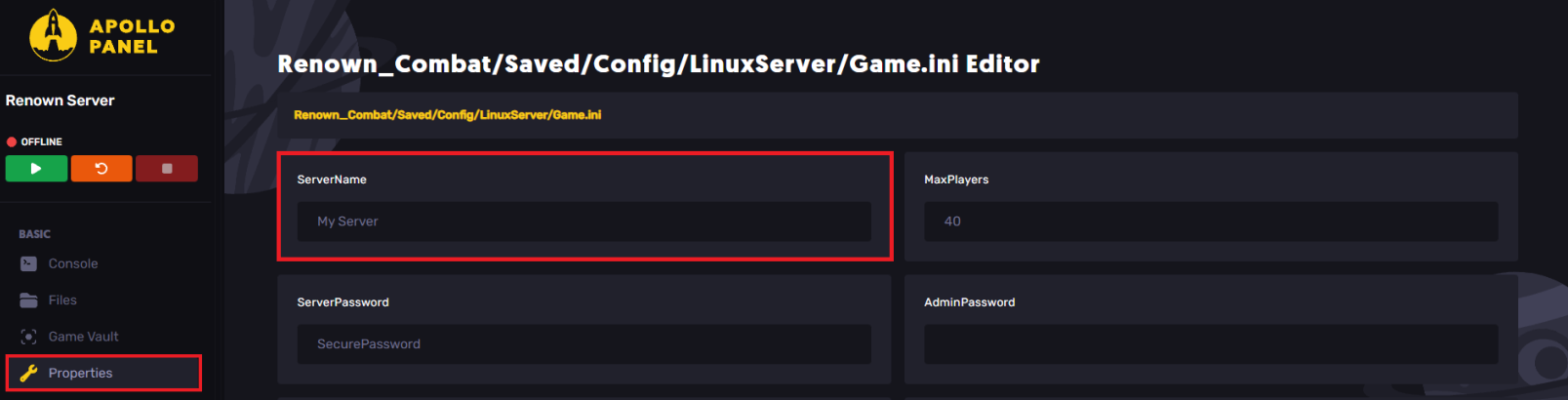
- Navigate to the Properties tab.
- Find the ServerName field, and change it as desired.
- Start the server.
Still have some questions?
If you encounter any issues, contact us by creating a support ticket here.
Updated on: 26/12/2025
Thank you!