How to Create a New World Save on a Renown Server
How to Create a New World Save on a Renown Server
Creating a new world save on a Renown server allows server owners to refresh gameplay, experiment with different settings, or start entirely new adventures for their community. By creating a new save, administrators can preserve progress, manage multiple worlds, and provide players with a fresh environment to explore, build, and engage in activities such as the in-game economy and collaborative projects. This practice helps maintain variety, ensures server reliability, and keeps the experience enjoyable for both new and returning players. This guide will show you how to create a new world save on a renown server so you can have a fresh start with friends!
To create a new world save, follow the steps below:
- Open your Apollo Panel here.
- Stop your server.
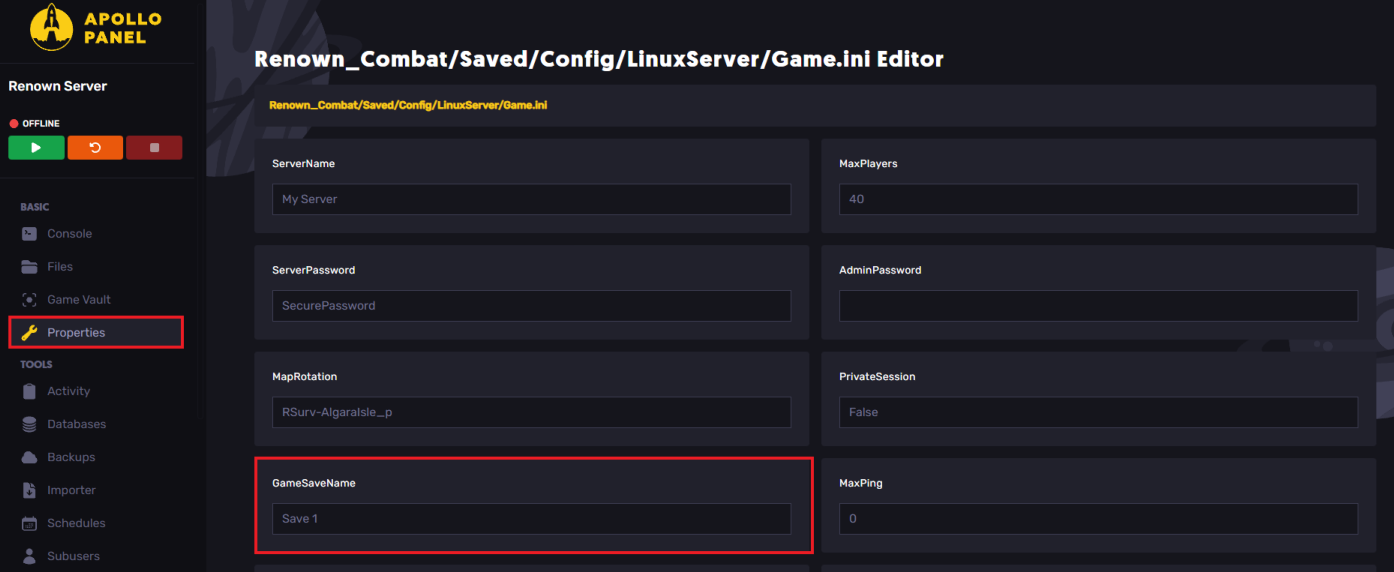
- Find the Properties tab.
- Locate the GameSaveName field and change it as desired.
To locate the save files, head over to the following directory: Renown_Combat/Saved/SaveGames
- Start the server and start playing!
Still have some questions?
If you need any further assistance, you can file a ticket here.
Updated on: 26/12/2025
Thank you!