How to Edit Resource Multipliers on a Renown Server
How to Edit Resource Multipliers on a Renown Server
Adjusting resource multipliers is a powerful way to customize gameplay, and knowing how to edit resource multipliers on a Renown server allows server owners to tailor the experience to their community’s preferences. By modifying global crafting or smelting multipliers, administrators can control how quickly players gather materials, produce items, and progress in a medieval world or other custom settings. Changing these values helps balance gameplay, encourages exploration and building, and ensures that both new and experienced players can enjoy a fair and engaging environment without disrupting the server’s economy or flow.
- Open your Apollo Control Panel here.
- Stop the server.
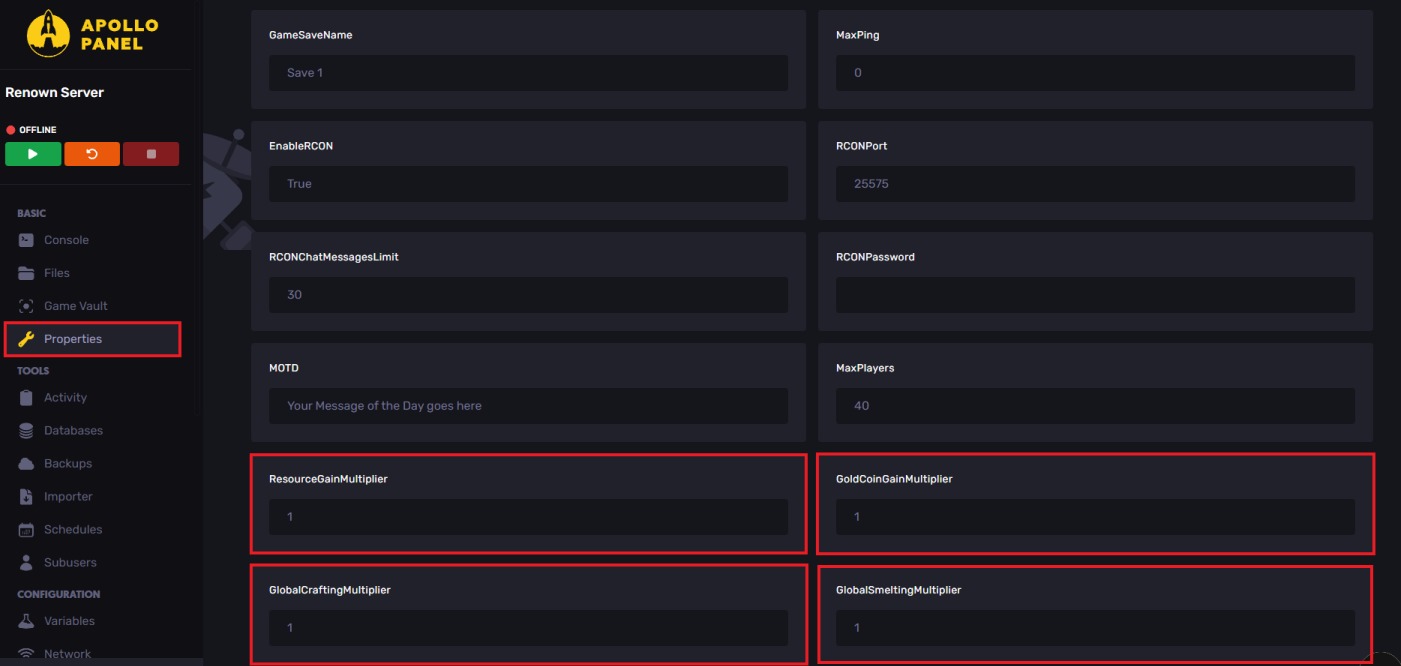
- Navigate to the Properties tab.
- Locate the Multipliers and set them as desired.
- Start the server and start playing with friends!
| Multiplier | Description |
ResourceGainMultiplier | Increases the amount of resources gained when gathering resources. |
GoldCoinGainMultiplier | Boosts the amount of gold you obtain from loot. |
GlobalCraftingMultiplier | Increases crafting time. |
GlobalSmeltingMultiplier | Increases the furnace smelting processes. |
Still have some questions?
If you need any further instructions, you can create a ticket here.
Updated on: 26/12/2025
Thank you!