How to Reset the World on an Astroneer Server
How to Reset the World on an Astroneer Server
Resetting the world on an Astroneer server is useful when starting fresh, fixing severe world issues, or preparing the server for a new group of players. This process removes the existing save data and generates a brand new world. This guide explains how to safely reset the world on an Astroneer dedicated server.
Understanding What a World Reset Does
A world reset permanently deletes the current world save. All player progress, bases, items, and terrain changes will be removed. Server configuration settings are not affected, but the world will regenerate as if the server were launched for the first time.
Before proceeding, make sure all players are aware that the reset cannot be undone.
Resetting the World
- Open the Apollo Panel and turn off your server.
- In the Files Tab, navigate to the "Astro/Saved" folder.
- Delete the "SaveGames" folder and its contents.
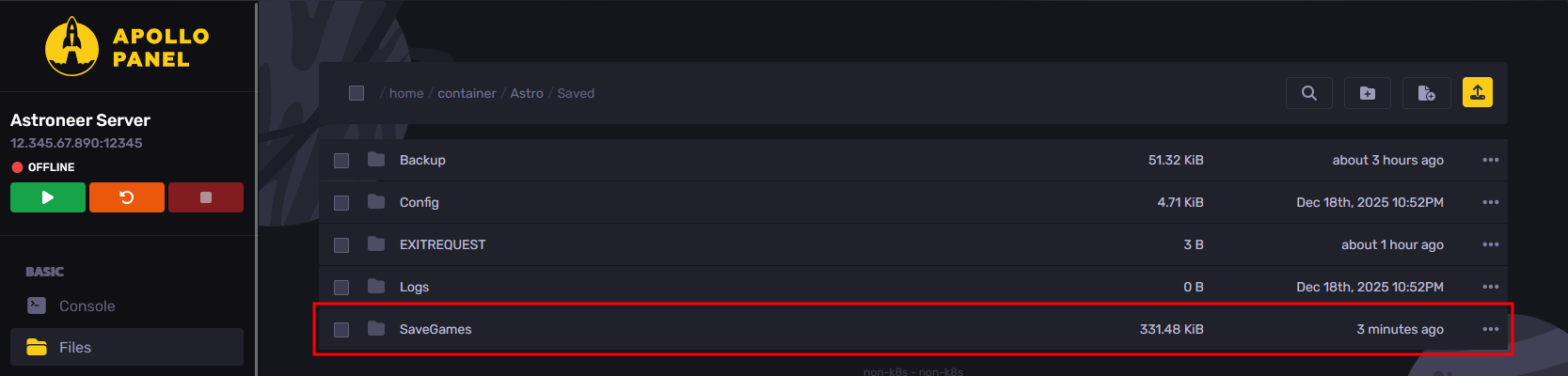
- Start the server, and the server will generate a new world on startup.
Updated on: 10/02/2026
Thank you!