Best Icarus Server Settings for Multiplayer
The best Icarus server settings for multiplayer depend on your group size and how you like to play. A well-configured server reduces lag and stuttering, protects your world, and makes it easy for friends to join.
Server Settings
- Access the Apollo Panel.
- Go to the Files tab.
- Navigate to the following directory: `Icarus/Saved/Config/`
- Open the `ServerSettings.ini` file.
- Start editing the desired settings.
Max Players
- Find and set the correct `MaxPlayers=` for your server.
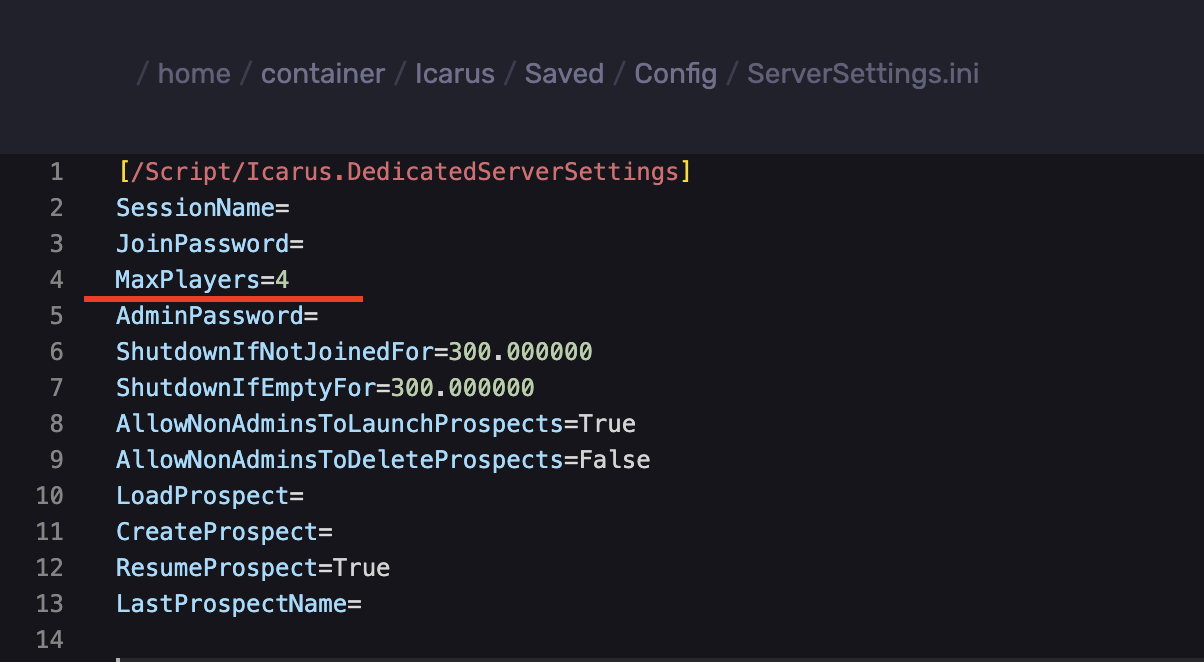
For a small server, 4 is a good starting point, and you can raise it if the server handles it well.
Passwords
- `JoinPassword` - This field is what players enter to join. Leave it empty for a public server, or set one to keep the server private.
- `AdminPassword` - This unlocks admin commands in-game. Set one, and never leave it blank, since an empty admin password lets anyone log in as admin.
Prospects
A prospect is a saved world.
- `AllowNonAdminsToLaunchProspects` - `True` lets any player start a prospect. Set it to `False` on a public server, so only admins can.
- `AllowNonAdminsToDeleteProspects` - Keep this at `False`, so no one can delete your world by accident.
- `ResumeProspect` - `True` loads the last prospect when the server starts, so your world is ready right away.
Updated on: 07/10/2026
Thank you!