How to Join an Icarus Dedicated Server
Learning how to join an Icarus dedicated server lets you and your friends play together on a private game server that stays online without a host running their PC. You can connect through the in-game server list or with Direct Connect on the Dedicated Servers screen, and once you're in, you can load a prospect and start playing.
- Access the Apollo Panel.
- Start the server.
- Copy the server's IP address and port.
- Open Icarus.
- Click Play.
- Select a character, or create a new one.
- Click Join.
- Click Dedicated Servers.
- Click Direct Connect.
- Enter your server's IP address and port, then click Confirm:
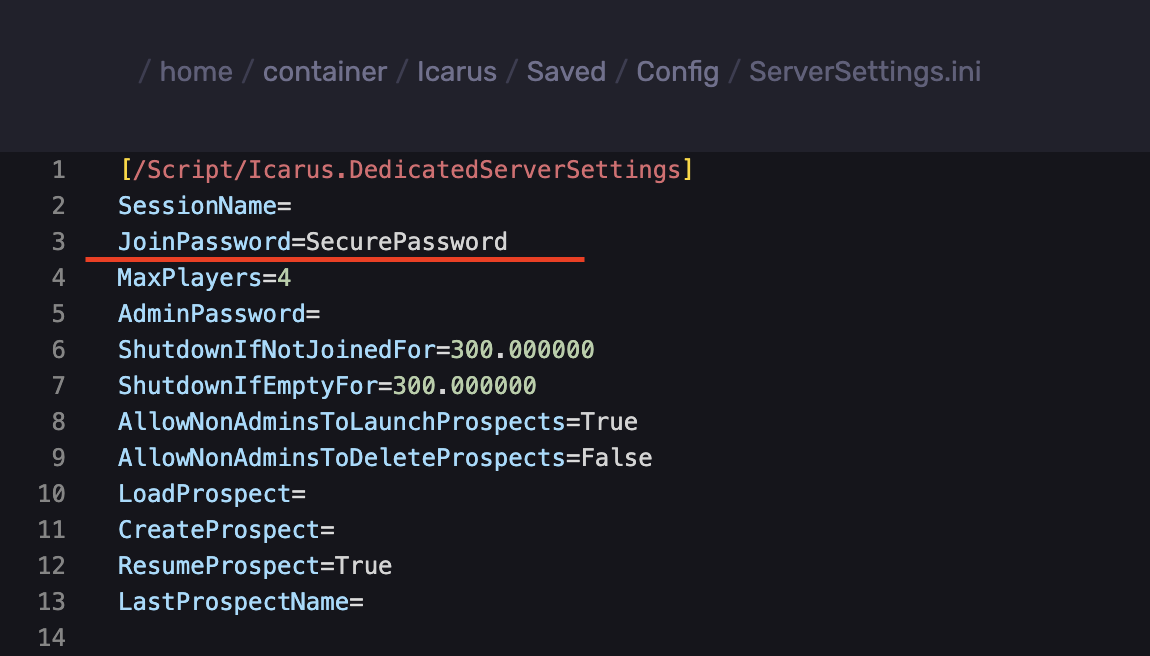
123.45.67.89:17777- If your server has a password, enter it and click Confirm.
If you are unsure of the password. Find it in the `Icarus/Saved/Config/ServerSettings.ini` directory.
Updated on: 07/10/2026
Thank you!