How to Fix Icarus Server Lag and Performance Issues
Knowing how to fix Icarus server lag and performance issues can save your game when a server slows down. Lag usually comes from an overloaded CPU, large bases, or a weak connection, and the fix depends on whether the problem is the server or your own PC.
Restart the Server
A server that has been running for a long time can slow down as it uses more memory.
- Access the Apollo Panel.
- Click Restart.
- Once it starts, connect to the server and watch CPU and RAM usage in the panel.
If either one is constantly maxed out. Refer to these fixes:
High CPU Usage
Lower Max Players
- Access the Apollo Panel.
- Stop the server.
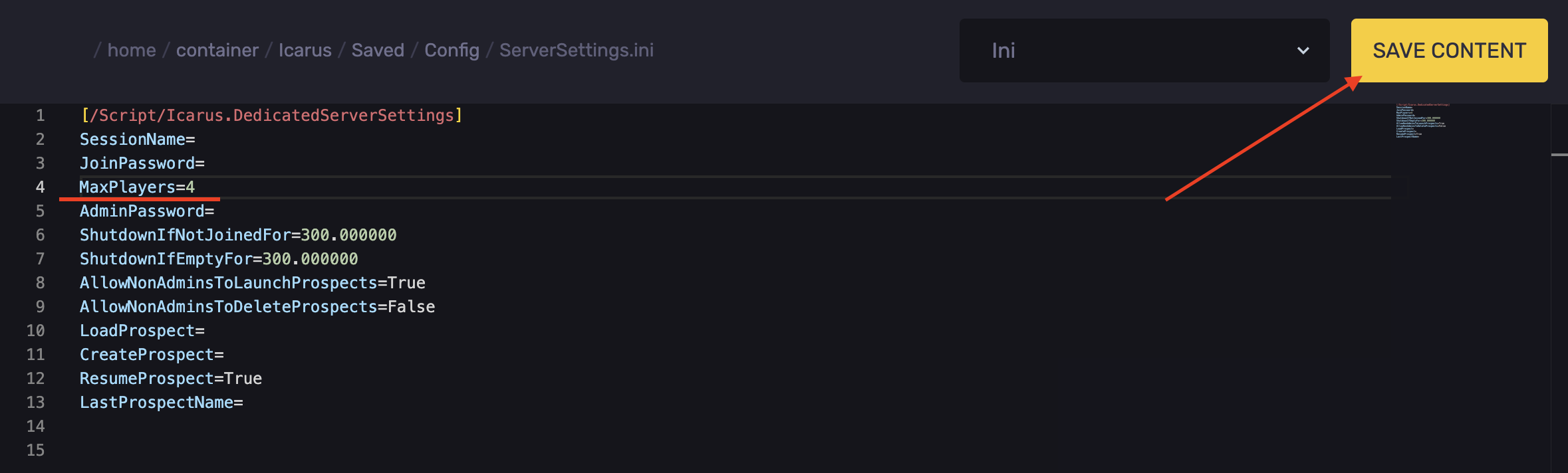
- Go to the Files tab.
- Navigate to the following directory: `Icarus/Saved/Config/`
- Open the `ServerSettings.ini` file.
- Find and lower the `MaxPlayers=` line.
- Click Save Content.
Game Workload
- Build smaller bases.
- Remove dropped items and deployables you don't use.
- Limit large farms and animal pens.
- Avoid running many crafting queues at once.
High RAM Usage
Schedule Restarts
- Access the Apollo Panel.
- Navigate to the Schedules tab.
- Restart the server about once a day, so memory doesn't build up. Schedule restarts here.
Remove Mods
- Access the Apollo Panel.
- Stop the server.
- Go to the Files tab.
- Navigate to the following directory: `Icarus/Content/Paks/mods`
- Remove any mods you don't need.
- Start the server.
Upgrade Your Plan
If the RAM is still maxed out after these steps, your plan may not have enough memory for the server. Upgrade your plan or contact support if unsure.
Updated on: 07/10/2026
Thank you!