How to Connect to FiveM Server
How to Connect to FiveM Server
This guide will show you how to connect directly to your FiveM server. IP address, and how to find your FiveM server in the server browser.
Via IP Address
The first method for connecting to your FiveM server is via. IP. To connect to your FiveM server via. IP address:
- Access the Apollo Panel.
- Start the server.
- Copy the IP address of your FiveM server in the top left of your control panel.
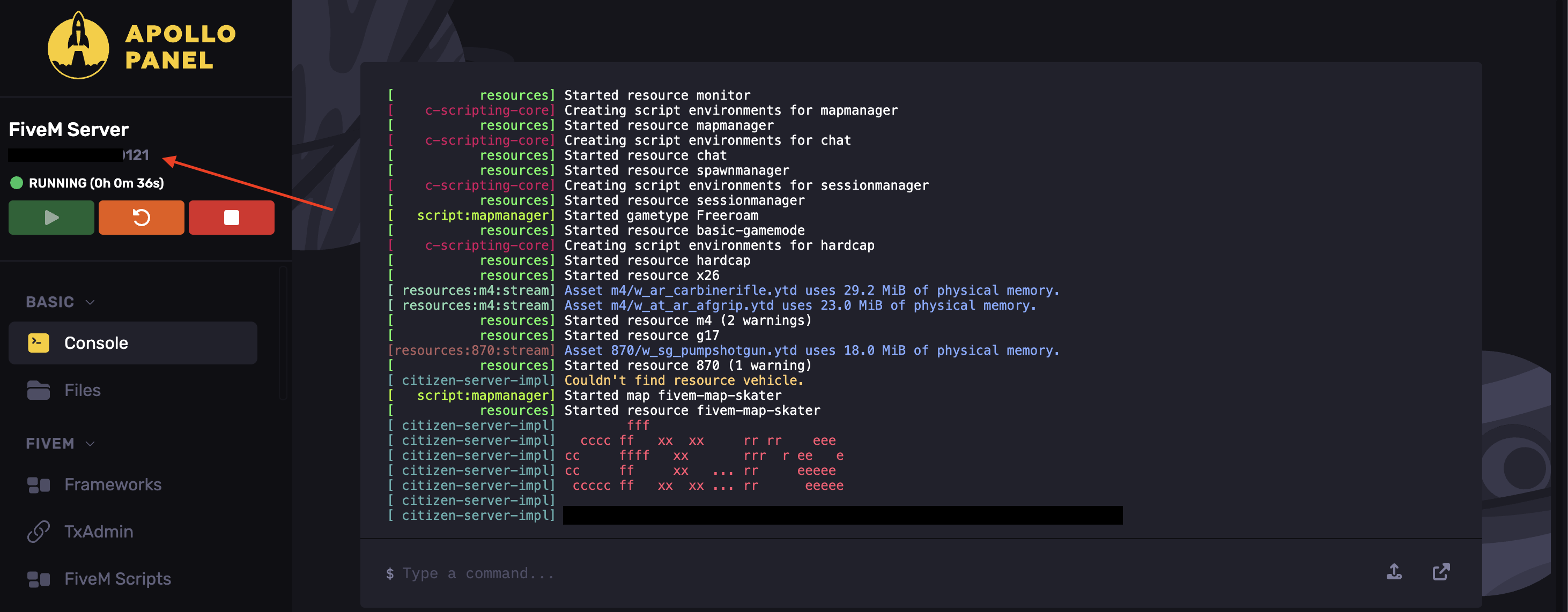
- Launch FiveM on your computer.
- Press F8 to open the game console.
- Type the command
*connect <yourserverIPhere>* (ex.connect 212.192.29.12); you do not need to worry about specifying a port.
Congratulations, you have successfully connected to your FiveM server via IP address!
Through The Server Browser
An easier method for connecting to your FiveM server is via. the server browser. To connect to your FiveM server via the server browser:
- Make sure your FiveM server is public; this will allow it to be found in search results.
- Run FiveM on your computer.
- Go to the server browser.
- Search for your server by typing in its name.
- Connect to the server!
Congratulations, you have successfully joined your FiveM server through the server browser.
Updated on: 17/07/2026
Thank you!