How To Make A Private Core Keeper Server
A Core Keeper private server keeps your world locked down to only the people you want playing, so randoms can't stumble in and mess with things. It's the go-to choice for friend groups or small communities that want a shared world without opening it to the public, giving you control over who joins while keeping it easy for the people who should be there.
Making A Private Core Keeper Server
To make a private Core Keeper server on a Sparked Host game server:
- Access the Apollo Panel.
- Stop the server.
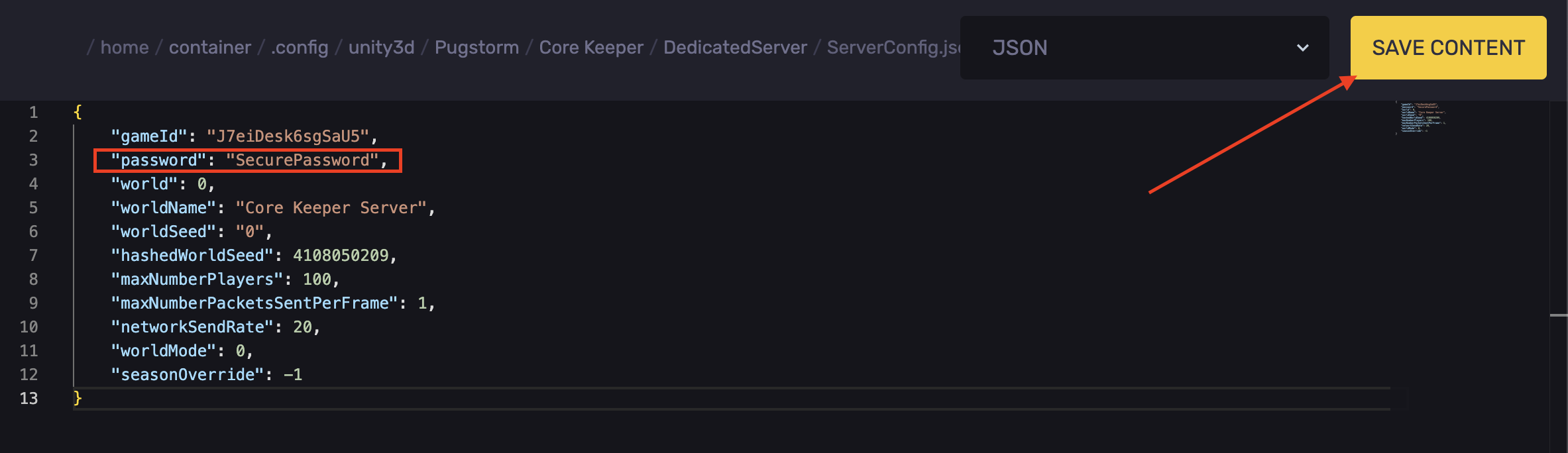
- Navigate to the following directory: `.config/unity3d/Pugstorm/Core Keeper/DedicatedServer`
- Open the `ServerConfig.json` file.
- Find the `"password":` line.
- Set a secure password.
- Click Save Content.
- Start the server.
Changing The Password For A Core Keeper Dedicated Server
The steps for changing the password on a Core Keeper server hosted on a VPS or a Dedicated server are similar:
- Access your dedicated server's files.
- Navigate to the following directory: `.config/unity3d/Pugstorm/Core Keeper/DedicatedServer`
- Open the `ServerConfig.json` file.
- Find the `"password":` line.
- Set a secure password.
Updated on: 21/09/2026
Thank you!