How To Add And Remove Admins On A Counter Strike 2 Server
Adding and removing admins on a Counter-Strike 2 server is an important part of server management that allows server owners to control admin permissions, assign immunity levels, and regulate who can use admin commands like kick, ban, or change map. This system is used on a dedicated server to keep order, protect server security, and ensure trusted users can help manage gameplay through structured roles and controlled access.
- Open your Apollo Panel.
- Stop the server.
- Head over to the Startup tab.
- Enable both the CounterStrikeSharp and MetaMod options.
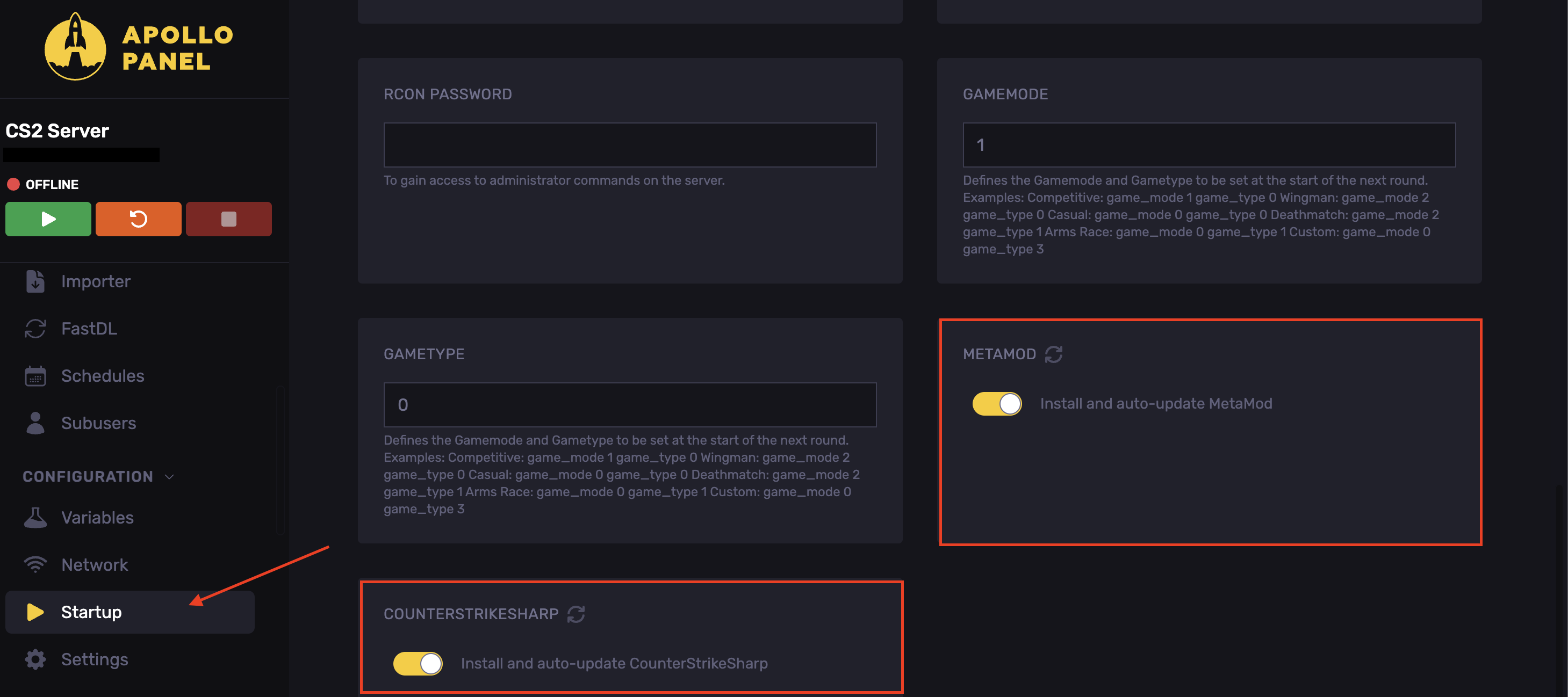
- Start the server.
- Stop the server.
- In the Files tab. Head over to the following directory:
game/csgo/addons/counterstrikesharp/configs
- Click on New File.
- Enter the following code and edit it as desired.
{
  "moderator": {
    "flags": ["@css/generic", "@css/kick"],
    "immunity": 20
  },
  "admin": {
    "flags": ["@css/generic", "@css/kick", "@css/ban", "@css/changemap"],
    "immunity": 50
  },
  "owner": {
    "flags": ["@css/root"],
    "immunity": 100
  }
}
- In the identity field, enter the steamID.
- The flags field is the permissions you will set.
- Click Create File.
- Set the file's name to
admins.json
You can also add group permissions by doing the following:
- Create a new file and paste the following:
{
  "simple-admin": {
    "flags": [
      "@css/generic",
      "@css/reservation",
      "@css/ban",
      "@css/slay"
    ],
    "immunity": 100
  }
}
- Set the file's name to
admins_group.json
- You will now be able to use the following in the
admins.json
{
  "Admin1": {
    "identity": "STEAM_0:1:12345678",
    "group": "simple-admin"
  }
}
- Start the server.
This is an example of the admin.json to remove an admin:
- Before:
{
  "Admin1": {
    "identity": "STEAM_0:1:12345678",
    "group": "simple-admin"
  },
  "Admin2": {
    "identity": "STEAM_0:1:87654321",
    "group": "simple-admin"
  }
}
- After:
{
  "Admin1": {
    "identity": "STEAM_0:1:12345678",
    "group": "simple-admin"
  }
}
- Save the file.
Updated on: 02/06/2026
Thank you!