How To Change The Game Mode On A Counter Strike 2 Server
Changing the game mode on a Counter-Strike 2 server is done to define how matches are structured, and how to change the game mode on a counter strike 2 server refers to setting the desired mode such as competitive, casual, deathmatch, or arms race. Server owners adjust this to control how the Counter-Strike 2 server behaves during gameplay, including rules, time limits, and match structure, ensuring players experience the intended style of play.
- Open your Apollo Panel.
- Stop the server.
- Head over to the Startup tab.
- Find the GameMode field and Gametype fields.
- Enter the desired game type and game mode.
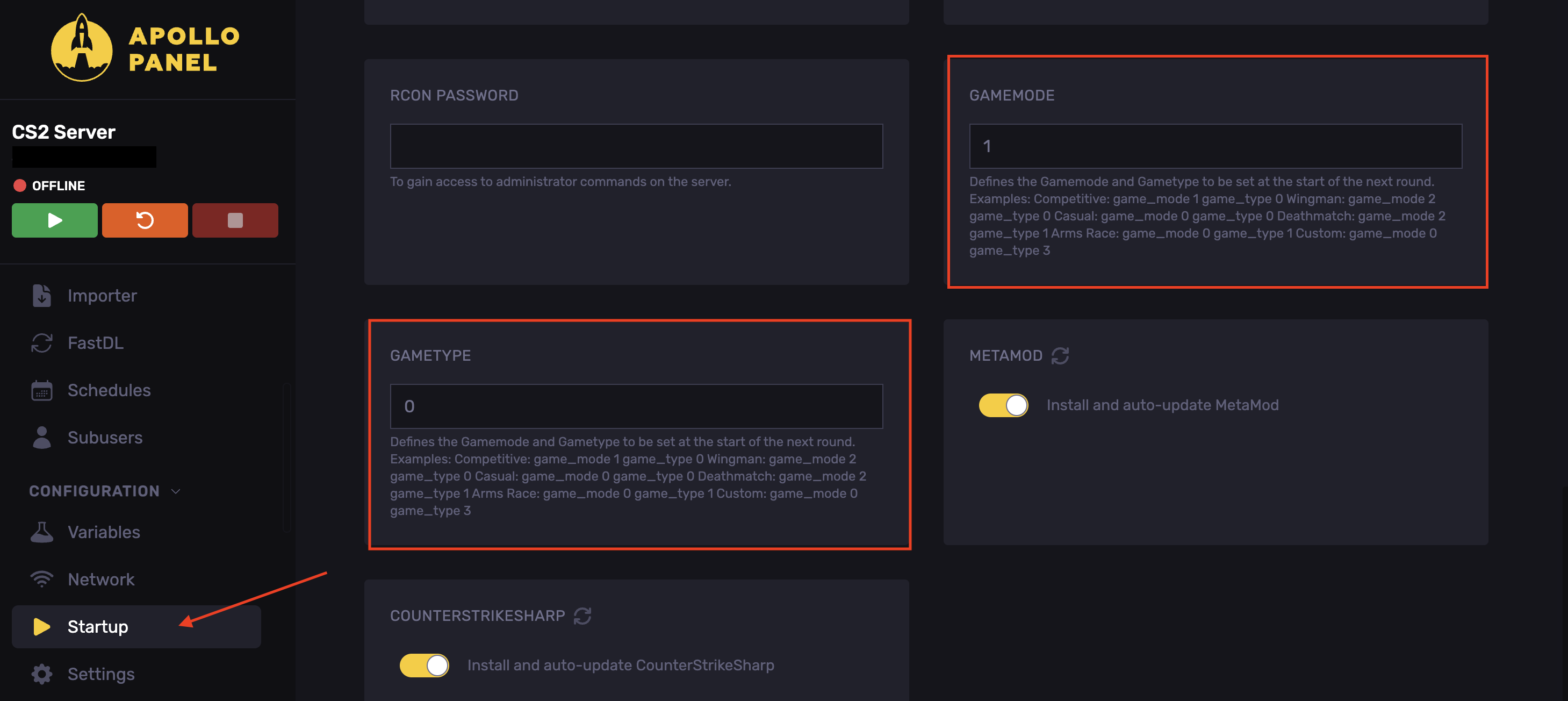
- Start the server.
These are the game types and modes:
Mode | GAMETYPE | GAMEMODE |
|---|---|---|
Competitive | 0 | 1 |
Casual | 0 | 0 |
Deathmatch | 1 | 2 |
Wingman | 0 | 2 |
Arms Race | 1 | 0 |
Custom | 3 | 0 |
Changing Game Mode Using The Console
You do not need to restart the server for this method.
- Open your Apollo Panel.
- Enter the following command in the console: `game_alias <Mode>; map <MapCode>

`
Updated on: 02/06/2026
Thank you!